
ADP – Payroll
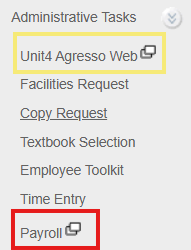
To access pay statements, W-2 Tax and Wage statements, and make changes to direct deposit or W-4 tax withholding forms, all employees must login to ADP.
Inside Augsburg > Administrative Tasks > Payroll
ADP Tax Estimator – Estimate how much tax will be taken out of your earnings. This is an estimate and may not be 100% accruate.
ADP Mobile App
ADP Mobile App Setup Guide (PDF)
- Download the ADP Mobile Application from your app store
- Launch the app.
- Tap New? Get Started
- Tap Yes, I’m Sure
- Prompt: Do you have a registration code? No
- Prompt: Where are you based? USA
- Enter your Legal name and Birth Date
- What is your Employee ID? Choose I don’t know my ID, even if you do
- Enter your Social Security number
- Review the data to confirm.
- You will be prompted to sign in with your Augsburg.edu credentials.
- In the future you should be able to login directly with your Augsburg.edu credentials
Accessing Your Pay & W-2 Tax Statements
- Pay statements are available on Fridays (paydays). Tax statements are available on or after January 31.
- Inside Augsburg > Administrative Tasks > Payroll
- Under Helpful Links choose Pay & Tax Statements
- Select the pay date and click View Statement > Download to access your full pay statement.
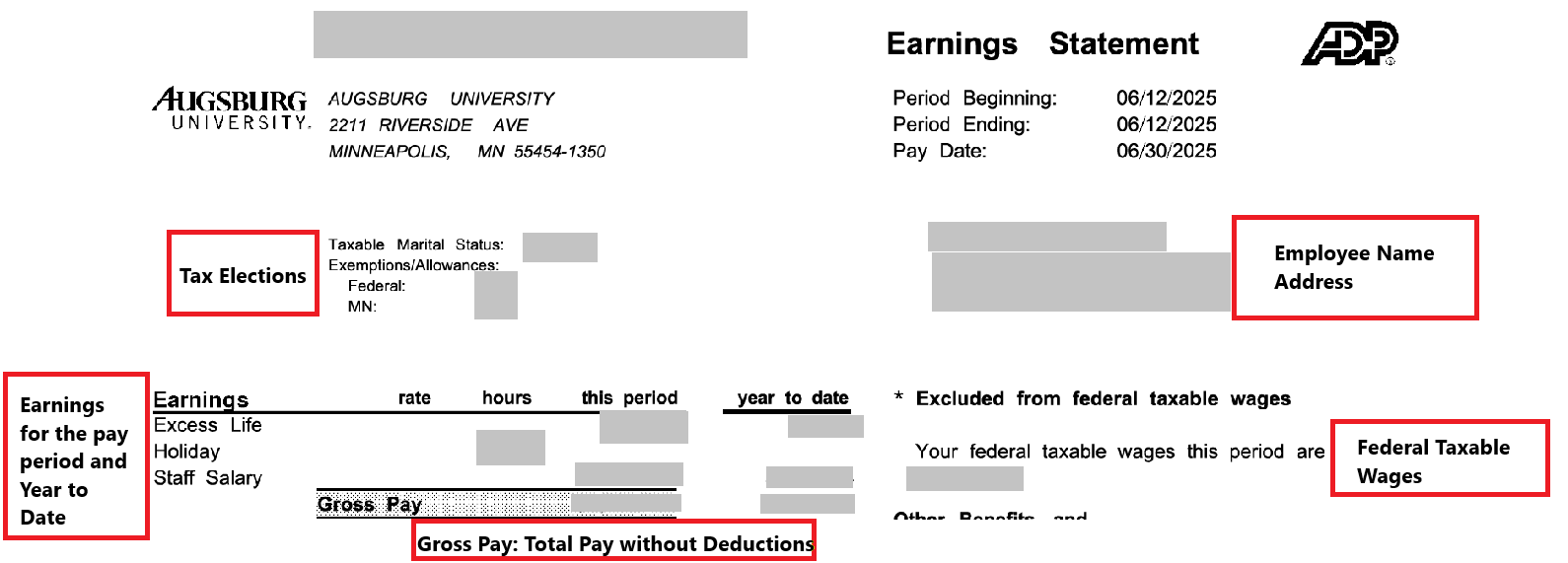
Understanding your Pay Statement
Pay statements (formerly “payslips”) in ADP may look different, but the same information is included. Due to space limits, some pay codes are abbreviated.
Notable Changes
- Tax-only earnings appear under both earnings and deductions. They do not affect net pay.
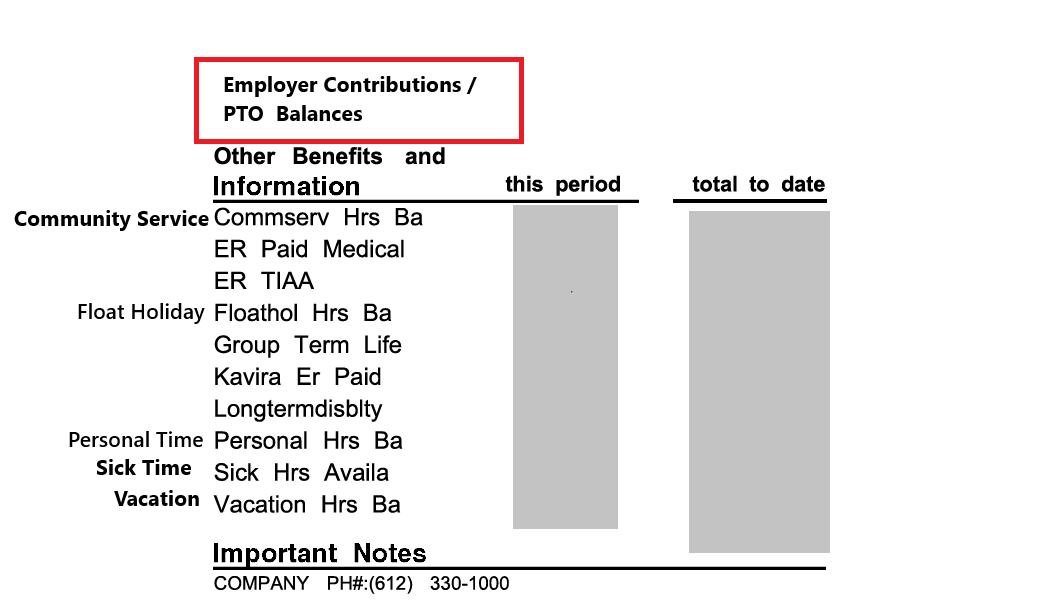
- Employer-paid benefits appear under “Other Benefits and Information” with the prefix ER.
- Long-Term Disability (LTD) appears in three places: Earnings, Deductions, and Memo (does not affect net pay).
- Employer Medicare and Social Security taxes are no longer listed but are still paid.
- Adjustments may show as a second line with the same label due to character limits.
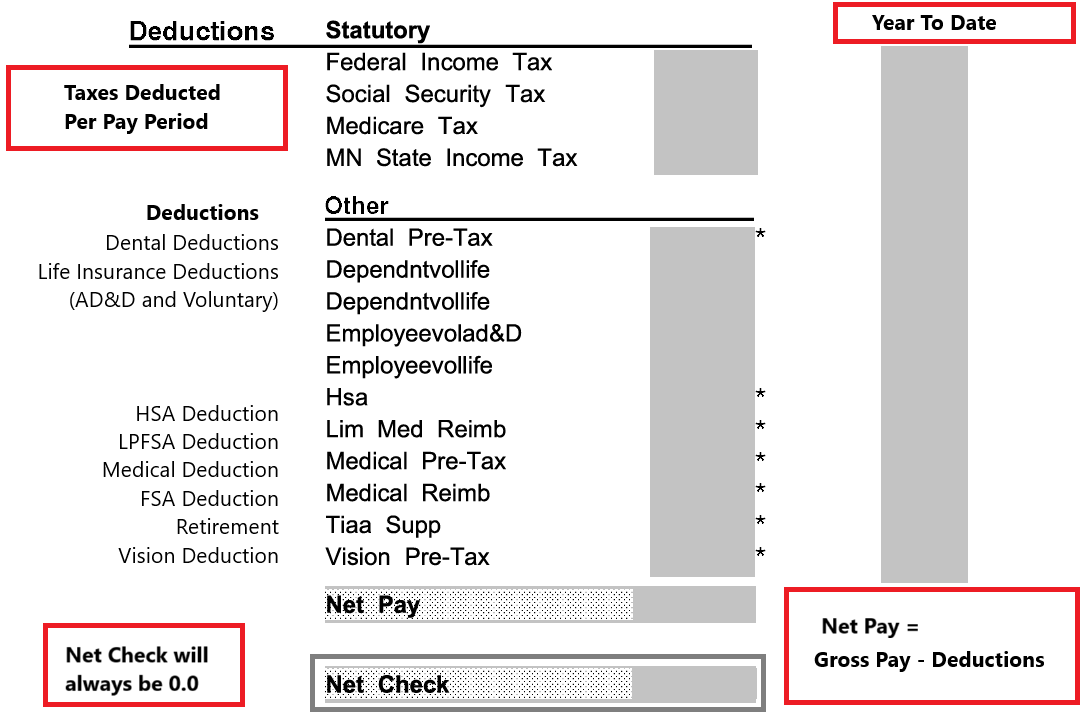
Deductions
- Deductions are shown with a minus sign (–), indicating amounts subtracted from your gross pay.
- An asterisk (*) indicates the deduction is excluded from federal taxable wages.
- Net Check reflects what would be paid by paper check. If you use direct deposit, the net will show $0.00.
Employer Contributions and Paid Time Off Balances
Employer contributions and paid time off balances will appear in the summary section of your pay statement.
Updating Tax Withholding & Direct Deposit
In ADP, you can update:
- Direct deposit (bank account)
- W-4 tax withholding
For updates to your name, address, or benefit elections, use the forms on the HR Forms page.
Update Tax Withholding
Update Direct Deposit
ACA 1095-C Form
Employer-Provided Health Insurance Offer and Coverage Information
Benefits eligible employees can access form 1095-C thru
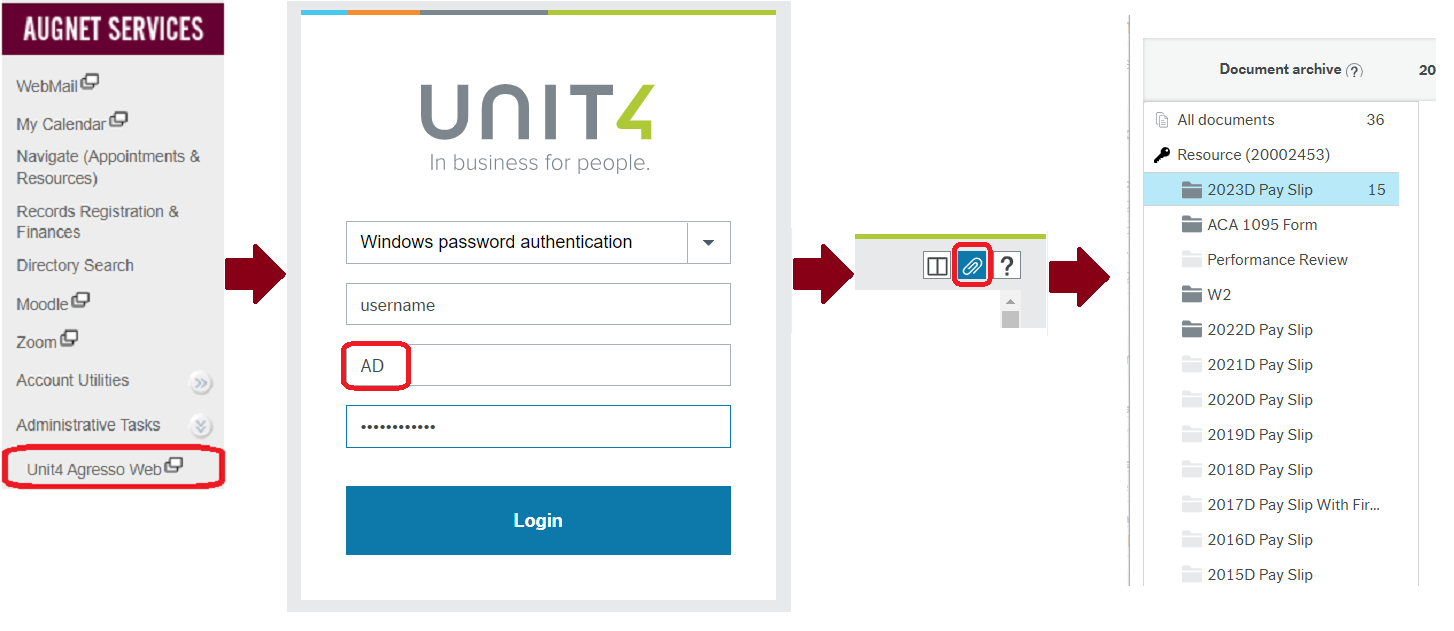
Inside Augsburg > Administrative Tasks > Unit4 (Agresso) Web
Documents (Paperclip icon) > ACA 1095 Form.
Notes
- The “covered individuals” section on the form is blank even if you had dependents enrolled in coverage. This section is for employer provided self-insured coverage only, which is different from what Augsburg offers.
- You do not have to wait for either Form 1095-B or 1095-C from your coverage provider or employer to file your individual income tax return. Do not file these forms with your tax return. Keep them in your records with your other important tax documents. See IRS FAQ.
- As of January 2026, the requirement for furnishing the statement is met if the employer provides clear, conspicuous, and accessible notice on its website that an individual may request a copy of their statement and the copy is timely furnished within 30 days of the request.
Where can I find my Pay & Tax Statements?
| Document Access | Before 7/1/2025 | After 7/1/2025 |
|---|---|---|
| Pay Statement | Unit4 Web | ADP |
| W-2 | Unit4 Web | ADP |
| 1095-C | Unit4 Web | Unit4 Web |
- Pay Statements and W-2 Tax Statements dated June 27, 2025, and earlier will continue to be available in Unit 4 (see below)
- Pay Statements dated July 1, 2025, and beyond will be accessible through the ADP portal.
-
-
- Navigate to ADP Payroll to review how to view your pay and tax statements in ADP.
-
-
- Form 1095-C Employer-Provided Health Insurance Offer and Coverage Information is available in Unit4 (see below)
Employee Pay and Tax Statements before July 2025
- Log in to Inside Augsburg, click Administrative Tasks > Unit4 Agresso Web.
- Log in with your augsburg Username, Domain=AD, and Password
- Click the Documents (paperclip) icon on the top right of the screen
Note: You may be asked to allow pop-ups for terra.augsburg.edu if you have not done so already - Click the W-2, ACA 1095 Form, or Pay Statements year folder. Documents will be available as PDF downloads
Student Worker Tax & Pay Statements before July 2025
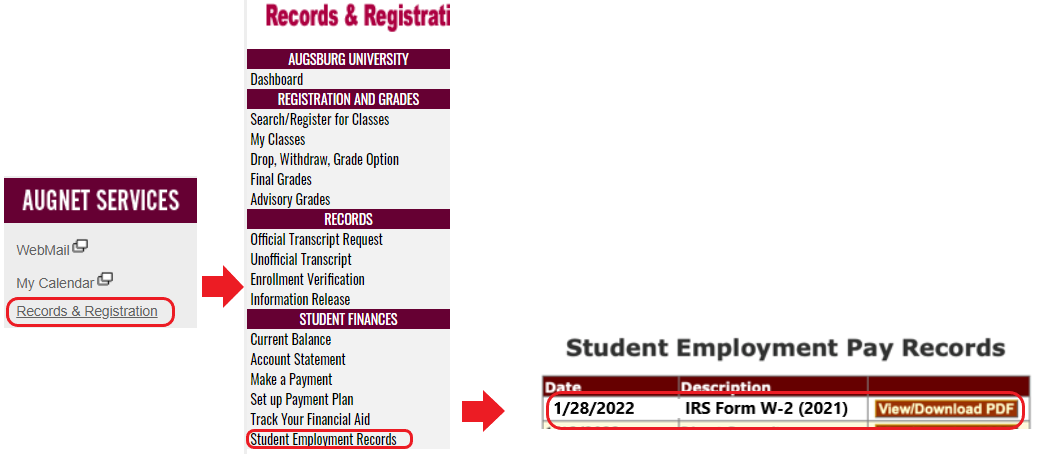
Current Students can access their W2s and Pay Slips from before July 1, 2025 through Records and Registration
- Login to Inside Augsburg, click Records & Registration
- Click Student Employment Records
- Look for the Pay Statements/ IRS Form W-2. Choose View/Download PDF
Request a copy of previous W2s
W2 forms were mailed to all current and former employees prior to January 31st. Please allow 5-7 business days for delivery. You may request a copy of older W2s.
Frequently Asked Questions
- Q: How do I update my information in ADP?
- A: You can update your direct deposit and tax withholding directly in ADP. Other updates should be made via HR forms